
On this page
01
Qwen-Image-Edit-Rapid-AIO at a glance
The short version, if you just clicked through from a model link:
- Creator
- Phr00t (Hugging Face user)
- Base model
- Alibaba's open Qwen-Image-Edit: version 2509 up to v14, version 2511 from v15 on
- What’s merged in
- Base model + Lightning 4-step accelerator LoRAs + VAE + text encoder, in one file
- File
- FP8 .safetensors, about 28.4 GB each
- Recommended settings
- 4 steps, CFG 1
- Builds
- Separate SFW and NSFW files since v5
- Latest version
- v23 — the author has stopped regular updates
- License
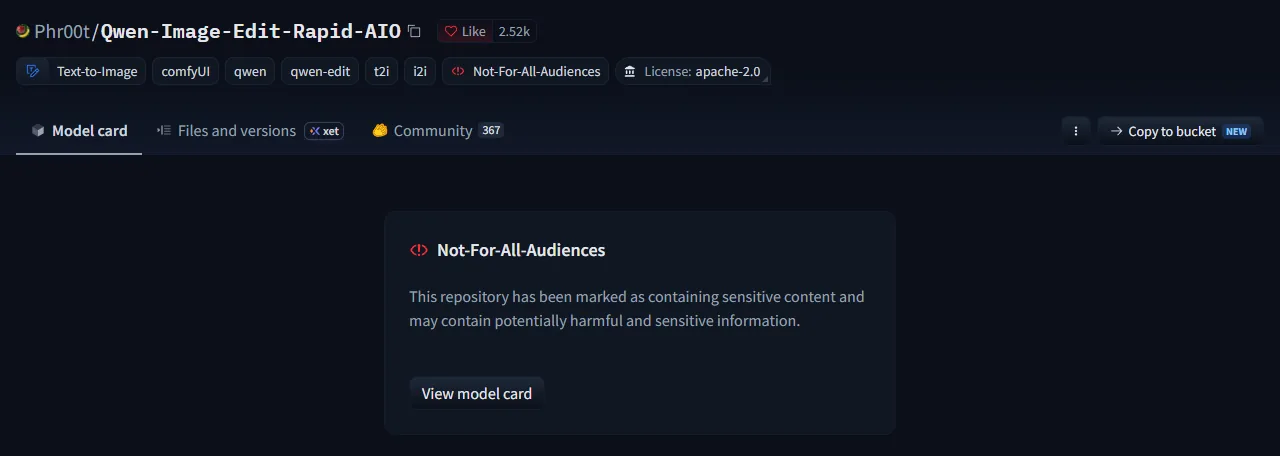
- Apache 2.0, flagged Not-For-All-Audiences on Hugging Face
- Runs in
- ComfyUI, on your own GPU or a rented one
02
What is Qwen-Image-Edit-Rapid-AIO?
Qwen-Image-Edit-Rapid-AIO is a community merge of Alibaba’s Qwen-Image-Edit, posted on Hugging Face by a user called Phr00t. Qwen-Image-Edit came out in August 2025 as an open model that changes a picture from a plain instruction, like “make her dress red” or “put her on a beach”. Version 2509 added multi-image input, and version 2511 got better at keeping the same person looking the same.
AIO means all-in-one. Normally you load four parts separately: the image model, a Lightning LoRA that cuts generation down to 4 steps, the VAE and the Qwen2.5-VL text encoder. Rapid AIO bakes all four into a single FP8 checkpoint, so one Load Checkpoint node in ComfyUI is enough.
What you can do with it:
- Edit an image by typing what you want changed.
- Combine up to 4 reference images, using the author’s fixed text-encode node.
- Make images from text alone: leave the image inputs empty and it works as a normal text-to-image model.
Why so many people use it: 4 steps is fast, there’s an NSFW build, and you skip wiring up four separate files. The repo has more than 2,500 likes and hundreds of discussion threads. One r/StableDiffusion user put it bluntly: the NSFW version is “hundred times better than original for NSFW”.
03
SFW vs NSFW: what’s different in the NSFW build
Up to v4, one file tried to do both, and the author wasn’t happy with the results. Since v5, every release comes as two files in the same version folder:
SFW build
Adds skin-texture and realism LoRAs to cut down the “plastic” look. For normal edits, portraits and product shots.
v19/Qwen-Rapid-AIO-SFW-v19.safetensors
NSFW build
Adds adult-content LoRAs on top, such as SNOFS, Sex-tacular and GNASS. The mix changes from version to version.
v19/Qwen-Rapid-AIO-NSFW-v19.safetensors
One exception: v15 only shipped an SFW file. If you want NSFW, skip it.
04
Which version should you use: v19 or v23?
There are 23 numbered releases, but you don’t need to read the whole changelog. The author already named two favorites on the model card:
After ~23 iterations of this ‘all in one’, I’m winding down providing updates. v19 is likely best for consistency in edits, while v23 is likely best for prompt adherence. I feel this project has peaked as new image edit models are being released…
Users mostly agree. In the v19 vs v23 thread, several people said they went back to v19 because faces hold up better and the lighting looks more natural. One user also ran out of memory with v23 on an RTX 5070 Ti.
Our advice: start with v19. Switch to v23 only if the model keeps ignoring what you asked for.
Version history, one line each
- v1–v4SFW and NSFW in a single file, built on 2509. The author called the results subpar.
- v5First release split into separate SFW and NSFW files.
- v7–v14More LoRAs merged in (MeiTu, Edit-R1, SNOFS, InSubject). v8 cut down grid artifacts.
- v15Moved to the Qwen-Image-Edit-2511 base. SFW only, no NSFW file.
- v16Sex-tacular LoRA added to the NSFW build.
- v172509 and 2511 blended together.
- v18Handles many input images better.
- v19Lightning Edit 2511 accelerator plus GNASS.Author’s pick for consistent edits
- v20Back to pure 2511; BestFaceSwap added.
- v21–v22Realism LoRAs swapped in and out (anything2real, JibMix Skin, qwen-skin-edit).
- v23Final release so far; JibMix removed.Author’s pick for prompt adherence
Recommended samplers
From the author’s notes. Every version runs at 4 steps and CFG 1.
| Version | Sampler / scheduler |
|---|---|
| v19 | er_sde / beta, or euler_ancestral / beta |
| v20–v23 | euler_ancestral / beta |
05
How much VRAM does Rapid AIO need?
The author doesn’t list hardware requirements, so here’s what people have actually reported:
- The full file is 28.4 GB. In one RunPod test, it froze while loading on a 24 GB RTX 4090. On a 32 GB RTX 5090 it ran fine and made an image in a few seconds.
- Less VRAM can work if you have lots of system RAM. Users report 8 GB of VRAM plus 64 GB of RAM running it, because ComfyUI moves what doesn’t fit into RAM. It’s a lot slower.
- Keep at least 40 GB of free disk space.
GGUF sizes vs. the full file
| Version | File size | Suggested VRAM | Note |
|---|---|---|---|
| Q2_K | 7.4 GB | 12 GB | Lowest quality, fits most cards |
| Q4_K_M | 13.3 GB | 16 GB | Common sweet spot |
| Q5_K_M | 15.1 GB | 24 GB | Close to full quality |
| Full FP8 file | 28.4 GB | 32 GB | Froze on a 24 GB RTX 4090 in one test |
VRAM suggestions are rules of thumb from user reports, not official numbers.
06
Qwen Image Edit Rapid AIO workflow in ComfyUI
The basic workflow for the full checkpoint takes five steps:
- 1
Download the checkpoint
Get the SFW or NSFW .safetensors file (about 28.4 GB) for the version you want from the Phr00t/Qwen-Image-Edit-Rapid-AIO repo on Hugging Face.
- 2
Put it in the checkpoints folder
Move the file into ComfyUI/models/checkpoints and restart ComfyUI.
- 3
Load it with Load Checkpoint
One Load Checkpoint node gives you MODEL, CLIP and VAE. There is no separate VAE or text encoder to load.
- 4
Write the edit in TextEncodeQwenImageEditPlus
Type your instruction and connect up to 4 input images. Use the author’s fixed version of this node (nodes_qwen.v2.py in the repo’s fixed-textencode-node folder) and feed it the same latent you sample from, so the picture doesn’t zoom or crop.
- 5
Sample at 4 steps, CFG 1
Use the sampler for your version (euler_ancestral / beta works for v19–v23). Leave the image inputs empty to use it as text-to-image.
Using the Phil2Sat GGUF version
The files at Phil2Sat/Qwen-Image-Edit-Rapid-AIO-GGUF are much smaller, but they are not all-in-one. Only the image model is inside, so you also need:
- The ComfyUI-GGUF custom nodes, to load .gguf files.
- A VAE, for example
pig_qwen_image_vae_fp32-f16.gguf. - A Qwen2.5-VL-7B-Instruct text encoder in GGUF (the abliterated version is a common pick) with its mmproj file in the same folder.
Forget the mmproj file and ComfyUI stops with mat1 and mat2 shapes cannot be multiplied. Another uploader, Novice25, has also posted GGUF versions if you can’t find the size you want.
07
Common problems and fixes
| Problem | Fix |
|---|---|
| Skin looks plastic or waxy | Add “Professional digital photography” to the prompt (the author’s own tip), or go back to v19. Some v19 users get better skin with res_2s / bong_tangent, 4 steps, shift 3 (RES4LYF nodes). |
| Picture zooms in, shifts or gets cropped | Use the author’s fixed TextEncodeQwenImageEditPlus node and feed it the same latent you sample from. |
| Blank or black images after a ComfyUI update | Switch to VAE Decode (Tiled), or lower the resolution. |
| Faint grid lines across the image | Change the sampler. euler_ancestral / beta is the safe default. |
| Face changes, looks older or gets “beautified” | A known issue in the community threads. Use v19 and ask for one change at a time. |
| Freezes or runs out of memory while loading | Use a GGUF version that fits your card, or add system RAM so ComfyUI can offload. |
| “mat1 and mat2 shapes cannot be multiplied” (GGUF) | The mmproj file is missing. Put it in the same folder as the text encoder. |
08
Can you use Rapid AIO online? Why the free Spaces keep going 404
Sometimes, but never reliably.
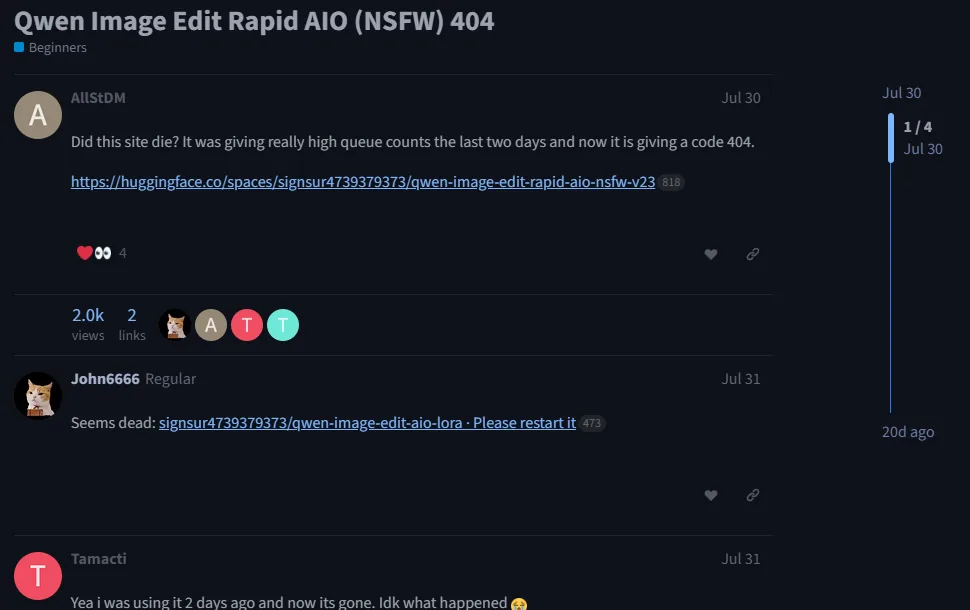
The most popular free v23 NSFW demo on Hugging Face Spaces had two days of very long queues at the end of July 2026, then went 404. Someone asked about it on the Hugging Face forum; the first reply was “Seems dead”. People were still asking in September.
Why free Spaces keep disappearing
- Free GPU time (ZeroGPU) has limits. Once a Space gets popular, the queue grows and it runs out.
- Owners can delete a Space or make it private at any time.
- Hugging Face disables Spaces that break its content policy. Even a v23 demo with 134 likes was taken down.
Other ways to run it online
| Option | What you get | The catch | Status |
|---|---|---|---|
| Free Hugging Face Spaces | Rapid AIO itself, sometimes the NSFW build | Long queues, frequent 404s, some run on CPU | Unreliable |
| RunningHub | Hosted ComfyUI workflows, NSFW Rapid AIO versions listed | Needs an account; you pay in credits | Works |
| openmedia.tools | A Qwen Image Edit 2511 NSFW page | Page says the tool is temporarily switched off | Not available |
| Qwen Chat (Alibaba) | The official Qwen image models | Not Phr00t’s merge, so not the NSFW build | Not available |
| fal, Replicate | Official Qwen-Image-Edit endpoints | No Rapid AIO NSFW endpoint found | Not available |
| Rent a GPU (RunPod etc.) | Full control over the real model | Paid by the hour; you set up ComfyUI yourself | Works |
| nsfwimg2video | NSFW text-to-image in the browser, free daily credits | Our own model; can’t edit uploaded photos | This page |
Checked in September 2026. These services change often.
09
No GPU? Make NSFW images online instead
If what you want is NSFW images, not edits to one specific photo, you don’t need a 28 GB model. The generator at the top of this page runs in your browser. Here’s an honest comparison:
| Feature | Rapid AIO (local) | nsfwimg2video |
|---|---|---|
| Edit a photo you upload | Yes | No |
| Make NSFW images from text | Yes | Yes |
| Graphics card needed | 24–32 GB, or lots of RAM | None |
| Install | ComfyUI + a 28 GB file | Nothing |
| Cost | Free (your own hardware) | Free daily credits |
| Turn the image into a video | No | Yes |
How to use it
- Step 1
Describe the image
Write who, what they’re wearing, the pose and the setting. Plain sentences work.
- Step 2
Pick a style
Realistic Girl, Visionary Girl or Cartoon Anime.
- Step 3
Generate
Free runs make one 2:3 image. Like it? Send it to image-to-video and animate it.
The same generator is also on our NSFW AI image generator page. For video from a text prompt, try the AI video generator.
10
Qwen Image Edit Rapid AIO FAQ
Is Qwen-Image-Edit-Rapid-AIO free?
Yes. It’s released under Apache 2.0 and free to download from Hugging Face. The real cost is hardware: each file is about 28.4 GB, and the full version wants a 24–32 GB graphics card or a lot of system RAM.
Does it support NSFW, and which file do I download?
Yes. From v5 on, each version comes as two files. Download the one with NSFW in the name, for example Qwen-Rapid-AIO-NSFW-v23.safetensors. There is no NSFW file for v15.
v19 or v23 — which version is best?
The author says v19 is likely best for consistency in edits and v23 for prompt adherence. Many users went back from v23 to v19 because faces hold up better. Start with v19; try v23 when following the prompt matters more than keeping the original.
Can I run it on 8, 12 or 16 GB of VRAM?
Not the full file, not comfortably. With 12 GB use the Q2_K GGUF, with 16 GB use Q4_K_M. People have run it on 8 GB with around 64 GB of system RAM by letting ComfyUI offload, but it’s slow.
Is the Phil2Sat GGUF an all-in-one file?
No. Only the image model is in the GGUF. You also need the ComfyUI-GGUF nodes, a separate VAE, and a Qwen2.5-VL-7B text encoder with its mmproj file next to it.
Why did the Rapid AIO NSFW Space go 404?
The most-used free v23 NSFW Space went down at the end of July 2026 after two days of very long queues, and the Hugging Face forum thread about it was still getting replies in September. Free Spaces vanish because free GPU time is limited, owners delete them, or Hugging Face disables them for breaking its content policy.
Is Rapid AIO still being updated?
Not really. After about 23 versions the author said they are winding down updates because newer image edit models are coming out. v23 is the latest release.
Does nsfwimg2video run Rapid AIO?
No. Our generator runs our own model. It makes new images from text, can’t edit an uploaded photo, and isn’t affiliated with Phr00t or Alibaba’s Qwen team.
Can I use Rapid AIO on photos of real people?
Not for sexual content. Making sexual images of a real person without their consent is illegal in many places, including under the US TAKE IT DOWN Act, and it’s not allowed on nsfwimg2video. Stick to fictional adult characters.
Can Rapid AIO make images without an input photo?
Yes. Leave the image inputs of TextEncodeQwenImageEditPlus empty and it works as a text-to-image model, still at 4 steps and CFG 1.
Sources
- Phr00t/Qwen-Image-Edit-Rapid-AIO — model card and version notes
- Phil2Sat/Qwen-Image-Edit-Rapid-AIO-GGUF
- Hugging Face forum: “Qwen Image Edit Rapid AIO (NSFW) 404”
- HF discussion #295: v19 vs v23
- HF discussion #86: realism and face drift
- RunPod test notes: 4090 vs 5090 (lilting.ch)
- r/StableDiffusion: user impressions
- r/StableDiffusion: VRAM discussion
- Qwen/Qwen-Image-Edit-2511 — official model card
Qwen is a trademark of Alibaba Cloud. nsfwimg2video isn’t affiliated with Alibaba or Phr00t. All model details on this page come from the public sources above.